Unlock Your Instagram Superpower: Mastering Insights for Audience Domination
Hey there, fellow Instagram enthusiasts! Ever feel like you're shouting into the void on Instagram? Posting gorgeous photos and witty captions, but the engagement's… well, let's just say it's not exactly setting the world on fire. You're not alone! We've all been there. It's like throwing a party and only your mom shows up (love you, Mom!).
The truth is, Instagram's not just about pretty pictures anymore. It's a sophisticated platform with a ton of data hidden beneath the surface, just waiting to be unlocked. And that key to unlocking this treasure trove of information? Instagram Insights. Think of it as your personal Instagram detective, giving you the lowdown on who your audiencereallyis, what content resonates with them, and how you can tweak your strategy to create content they adore.
Imagine knowing exactly what time your followers are most active. No more guessing! Imagine understanding the demographics of your audience, so you can tailor your content to their interests. No more generic posts! Imagine seeing which posts are driving the most engagement, so you can replicate that magic. It's like having a cheat code for Instagram success.
But navigating Instagram Insights can feel a bit overwhelming at first. Where do you even start? What metrics areactuallyimportant? How do you translate all that data into actionable strategies that will grow your audience and boost your engagement? Don't worry, friends, we're about to embark on a journey to demystify Instagram Insights and transform you into an Instagram analytics ninja! Are you ready to uncover the secrets hidden within your Instagram account and take your content to the next level?
How to Use Instagram Insights to Analyze Your Audience
Alright, let's dive into the exciting world of Instagram Insights! It's time to ditch the guesswork and start making data-driven decisions. This isn't about becoming a statistician; it's about understanding your audience better and creating content they'll actually love. Think of it as learning to speak your audience's language – and who doesn't want to be fluent in that?
Accessing Instagram Insights: Your Digital Dashboard

First things first, you need to know where to find this magical data. Luckily, Instagram makes it pretty straightforward.
- Make sure you have a Business or Creator Account: Personal accounts don't have access to Insights. Switching is easy and free! Go to your profile, tap the menu icon (three lines) in the top right corner, select "Settings," then "Account," and finally "Switch to Professional Account." Choose the category that best describes your brand or business.
- Navigate to your Insights: Once you're a professional, you'll find Insights in a few places. You can tap the "Insights" button directly on your profile page (if you have it), or you can go to the menu (three lines) in the top right corner of your profile and select Insights.You'll see an overview of your account activity.
Understanding the Overview: A Quick Snapshot
The Overview section gives you a quick rundown of your account's performance over the last 7 or 30 days (you can adjust the date range). Pay attention to these key metrics:
- Reach: This is the number ofuniqueaccounts that have seen your content. It's a great indicator of how widely your content is being distributed. Think of it as the number of different people who attended your party.
- Impressions: This is the total number of times your content has been displayed. One account can see your post multiple times, so impressions are usually higher than reach. This is like the total number of times someone saw an ad for your party.
- Account Activity: This shows the number of profile visits, website taps, and email/call button clicks you've received. These actions demonstrate interest and engagement with your brand.
- Content Interactions: This displays the number of likes, comments, saves, and shares your posts have received. This is direct feedback on how much your audience is enjoying your content. Saves are particularly valuable, as they indicate that someone found your content useful enough to save for later.
Deeper Dive: Analyzing Your Audience Demographics
Now, let's get to the juicy stuff – understandingwhoyour audience actually is. This is where you can really tailor your content to resonate with them.
- Total Followers: This metric tracks how many accounts follow you in total.
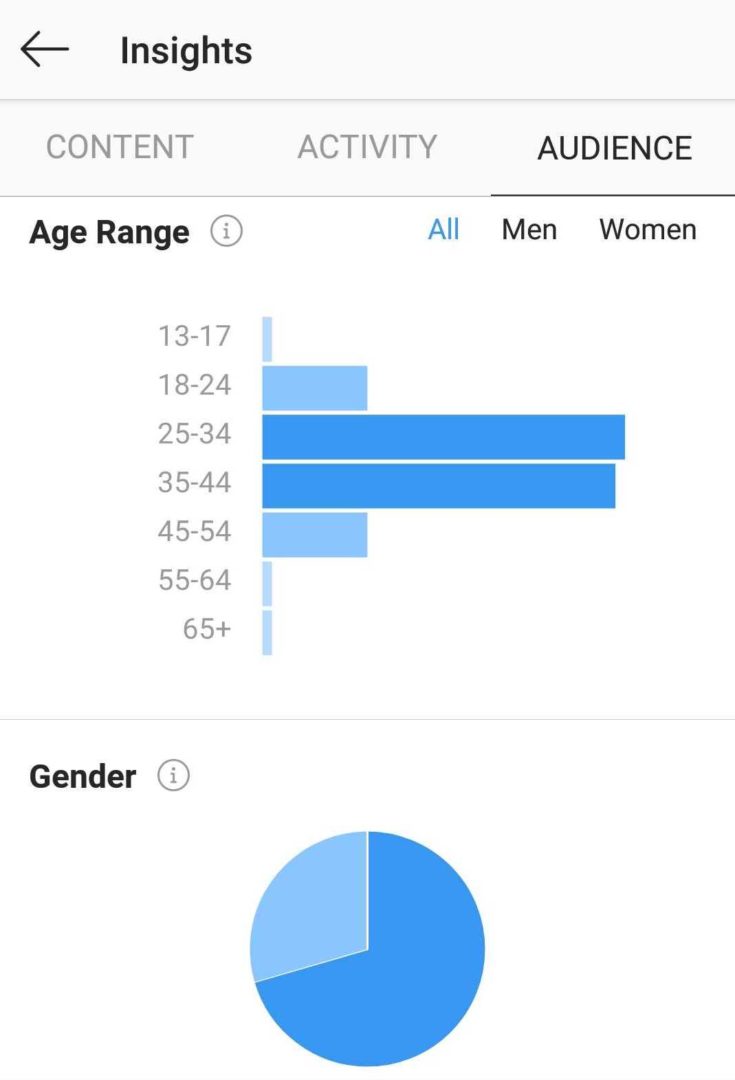
- Follower Demographics: Insights provides data on the gender, age range, and top locations (cities and countries) of your followers. This is incredibly valuable for tailoring your content. For example, if you find that a large portion of your audience is women aged 25-34 in New York City, you can create content that specifically appeals to that demographic.
- Follower Activity: This section shows you the average times your followers are most active on Instagram. This is crucial for scheduling your posts for maximum visibility. Posting when your audience is online increases the chances of your content being seen and engaged with.
Content Analysis: Decoding What Works (and What Doesn't)
This is where you analyze the performance of your individual posts, stories, reels, and IGTV videos. Here's what to look for:
- Post Insights: For each post, you can see its reach, impressions, likes, comments, saves, and shares. Analyze which types of posts perform best. Are your followers more engaged with photos, videos, or carousels? Do they prefer educational content, behind-the-scenes glimpses, or user-generated content? Look for patterns and replicate what works.
- Story Insights: Stories disappear after 24 hours, but their insights are valuable. Track impressions, reach, taps forward, taps back, and exits. Taps forward indicate that people are quickly skipping through your story, while taps back suggest they want to re-watch something. Exits show where people are dropping off, which could indicate that they found a particular slide uninteresting. Use sticker insights to see how many people interacted with polls, quizzes, and questions.
- Reels Insights: Reels are a great way to reach a wider audience. Pay attention to views, likes, comments, saves, and shares. Analyze which types of Reels are performing best. Are your followers more engaged with trending audio, original content, or educational tutorials?
Putting It All Together: Actionable Strategies
Now that you have all this data, how do you actually use it to improve your Instagram strategy?
- Tailor Your Content: Use demographic data to create content that resonates with your audience's interests, needs, and preferences.
- Optimize Your Posting Schedule: Post when your audience is most active to maximize visibility and engagement.
- Experiment with Different Content Formats: Try different types of posts (photos, videos, carousels, Reels, Stories) to see what performs best.
- Engage with Your Audience: Respond to comments, ask questions, and run polls to foster a sense of community.
- Track Your Progress: Regularly monitor your Insights to see how your strategies are performing and make adjustments as needed.
Real-World Example: A Case Study
Let’s say you run a fitness account. You notice that your followers are primarily women aged 25-34 in Los Angeles, and they're most active on Instagram between 6 PM and 9 PM on weekdays. Based on this data, you could tailor your content to focus on workout routines that are effective for busy women, post during those peak hours, and use relevant hashtags like #LAfitness and #womensfitness. You could also create Instagram Stories with polls asking your audience what types of workouts they're most interested in.
Future Predictions: The Evolution of Instagram Insights

Instagram Insights are constantly evolving, and we can expect to see even more sophisticated analytics in the future. Here are a few potential developments:
- More granular audience data: Expect to see more detailed demographic information, such as income level, education, and interests.
- Predictive analytics: Instagram may start using AI to predict which types of content are most likely to perform well based on past data.
- Integration with other platforms: We may see more seamless integration between Instagram Insights and other analytics tools, such as Google Analytics.
By mastering Instagram Insights, you can transform your Instagram presence from a shot in the dark to a laser-focused strategy that drives real results. So, go forth and analyze! Your audience is waiting to be understood.
Frequently Asked Questions (FAQs)
Here are some common questions about using Instagram Insights:
- Q: How often should I check my Instagram Insights?
- A: It depends on your posting frequency. If you post daily, check your Insights at least once a week. If you post less frequently, check them every few weeks. The more data you have, the more accurate your analysis will be.
- Q: What's more important, reach or impressions?
- A: Both are important, but they tell you different things. Reach tells you how many unique accounts you're reaching, while impressions tell you how many times your content is being displayed. If you want to increase brand awareness, focus on reach. If you want to increase engagement, focus on impressions.
- Q: Can I track Insights for past posts?
- A: Yes, you can access Insights for all of your past posts, stories, Reels, and IGTV videos. This is a great way to see how your content has performed over time and identify trends.
- Q: My Insights data seems inaccurate. What should I do?
- A: Sometimes there can be discrepancies in Instagram Insights data. Try refreshing your app, clearing your cache, or contacting Instagram support.
In conclusion, unlocking the power of Instagram Insights is like discovering a secret weapon in your social media arsenal. It's not just about vanity metrics; it's about understanding your audience, tailoring your content, and ultimately, achieving your Instagram goals. By analyzing your audience demographics, content performance, and engagement metrics, you can create a data-driven strategy that will help you grow your following, boost your engagement, and build a thriving community.
So, here's your call to action: Spend some time this week exploring your Instagram Insights. Identify one key takeaway and use it to inform your next post or story. Remember, consistent analysis and adaptation are key to Instagram success.
Now go out there and conquer Instagram! You've got the knowledge, the tools, and the motivation to make it happen. What small change will you make today to get one step closer to your Instagram goals?
