Level Up Your Tik Toks: Mastering Mobile Video Editing
Hey there, Tik Tok aficionados! Ever scroll through Tik Tok and think, "Wow, how did they do that?" I get it. You've got the killer dance moves (or the hilariously awkward pet moments), but making your videos stand out in the endless stream of content? That's the real challenge. Think of it like this: you've got the ingredients for a gourmet meal, but you need the right chef's knife – in this case, the perfect video editing app – to truly make it shine. We're not talking about just slapping on a filter and calling it a day (though those have their place too!). We're talking about crafting engaging stories, adding slick transitions, and generally transforming your raw footage into something share-worthy. Remember that time you tried to bake a cake without a recipe? Disaster, right? Same principle applies here. Without the right tools and a little know-how, your Tik Toks might just get lost in the shuffle. I've spent countless hours (yes, I admit it!) experimenting with different apps, enduring frustrating interfaces, and finally stumbling upon a few gems that have genuinely elevated my own Tik Tok game. The struggle is real, my friends, but the reward – viral fame (or at least, a few extra likes) – is worth it. So, are you ready to ditch the basic edits and unlock the secret sauce to creating captivating Tik Toks that will leave your followers wanting more? Let's dive in and discover the best Tik Tok video editing apps and some easy tips to make your videos pop! You might even surprise yourself with what you can create.
Diving Deep into Tik Tok Video Editing Apps & Easy Tips
Alright, let's get down to business. You want your Tik Toks to be awesome, right? That means stepping up your editing game. The good news? You don't need to be a Hollywood director to create engaging content. You just need the right tools and a little bit of know-how. We’re here to help you navigate the often overwhelming world of video editing apps to find the perfect fit for your creative vision. Forget complicated desktop software – we're focusing on mobile apps that put the power of professional editing right in your pocket.
Choosing the Right App for You
Before we jump into specific apps, let's talk about what to look for. Think about your needs and skill level. Are you a complete beginner? Do you need tons of fancy features, or are you just looking for something simple and easy to use? Here are some key things to consider:
• User-Friendliness: This is huge, especially if you're just starting out. The app should have an intuitive interface that's easy to navigate. Nobody wants to spend hours trying to figure out how to add a simple text overlay. Look for apps with clear instructions, helpful tutorials, and a layout that makes sense to you.
• Features: What kind of editing do you want to do? Do you need to add text, music, filters, transitions, or special effects? Make a list of the features that are most important to you and look for apps that offer them. Remember, more isn't always better. It's better to have a few well-executed features than a ton of clunky ones.
• Price: Many apps offer a free version with limited features and a paid version with more bells and whistles. Consider whether the paid features are worth the cost for you. Sometimes, the free version is all you need! And don’t forget to check for subscriptions – they can add up quickly.
• Export Quality: This is crucial! You want your videos to look crisp and clear when you upload them to Tik Tok. Make sure the app allows you to export videos in high resolution (at least 1080p). There’s nothing worse than spending hours editing a video only to have it look pixelated and blurry when it’s finally online.
• Compatibility: Does the app work on your phone (i OS or Android)? Check the app store before you download to ensure compatibility. This seems obvious, but it’s a common mistake.
Top Tik Tok Video Editing Apps: Our Recommendations
Okay, let's get to the good stuff! Here are some of my favorite Tik Tok video editing apps, along with their pros and cons:
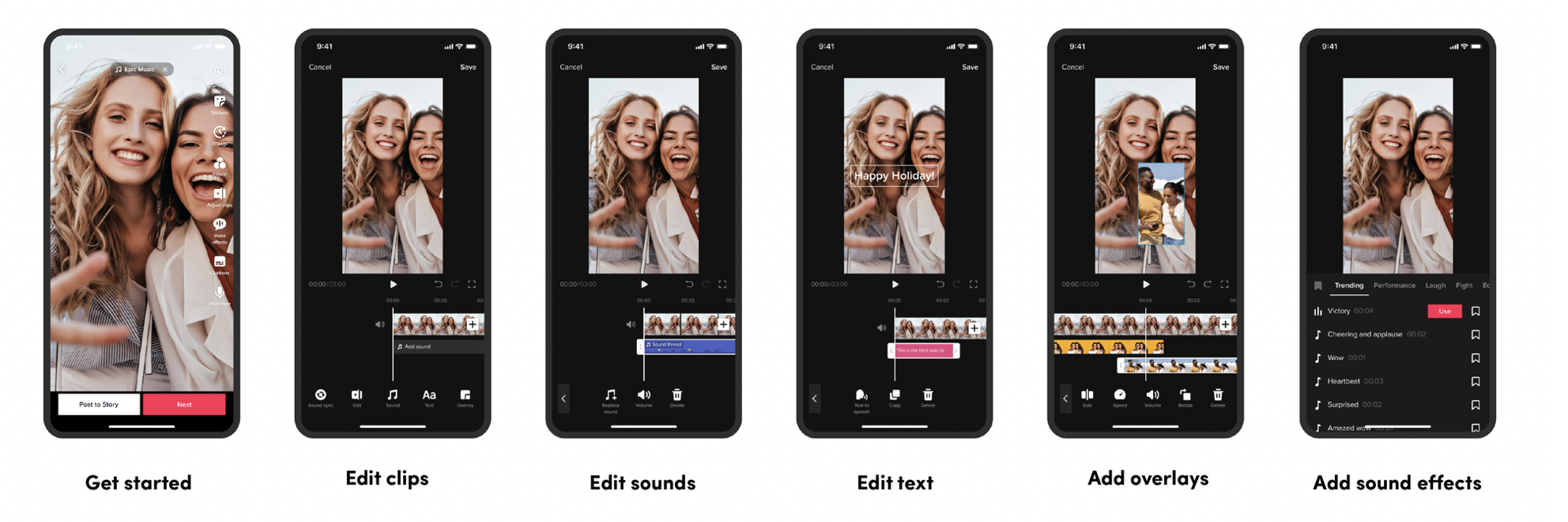
• Tik Tok (Yes, Really!): Let's not forget the OG! Tik Tok's built-in editor is surprisingly powerful. It's perfect for quick edits, adding music, filters, and text. Plus, it's integrated directly into the platform, so you don't have to worry about exporting and importing videos. The downside? It can be a bit limited for more complex edits.
• Pros: Easy to use, free, integrated with Tik Tok.
• Cons: Limited features for advanced editing.
• Cap Cut: This app is a powerhouse! It's packed with features like advanced filters, transitions, text animations, and even chroma key (green screen) capabilities. It's also free to use! It’s great for creating engaging Tik Tok videos.
• Pros: Free, tons of features, user-friendly.
• Cons: Can be overwhelming for beginners.
• VN Video Editor: VN is another fantastic free option. It's similar to Cap Cut in terms of features, but it has a slightly different interface. It’s a great choice for more complex edits.
• Pros: Free, advanced features, non-destructive editing.
• Cons: Steeper learning curve than Cap Cut.
• In Shot: In Shot is a popular choice for its simple interface and wide range of features. It's great for adding text, music, filters, and transitions. It also has a built-in video trimmer and joiner. It’s easy to add borders to your videos to make them fit perfectly on Instagram too.
• Pros: Easy to use, versatile, affordable.
• Cons: Free version has watermarks.
• Videoleap: This app is for those who want to take their editing to the next level. It offers advanced features like layering, blending modes, and keyframe animation. It’s the choice for more advanced editors.
• Pros: Professional-level features, powerful editing tools.
• Cons: Paid subscription, steeper learning curve.
Easy Editing Tips to Make Your Tik Toks Shine
Now that you have a few app options to choose from, let's talk about some easy editing tips that will instantly elevate your Tik Toks:
• Trim the Fat: Nobody wants to watch a long, rambling video. Get straight to the point by trimming out any unnecessary footage. Keep your videos concise and engaging. Remember, attention spans on Tik Tok are short! Cut out any dead air or awkward pauses to keep your viewers hooked.
• Add Music: Music is key to a successful Tik Tok. Choose a song that's trending or that complements your video. Use Tik Tok's built-in music library or add your own music. Just be mindful of copyright issues! A catchy tune can make all the difference between a viral sensation and a forgotten post.
• Use Transitions: Transitions are a great way to add visual interest to your videos. Experiment with different transitions to find the ones that work best for your style. Just don't overdo it! Too many transitions can be distracting. Simple fades and cuts are often the most effective.
• Text is Your Friend: Use text overlays to add context, humor, or call-to-actions to your videos. Make sure your text is easy to read and doesn't cover up important parts of the video. Use different fonts, colors, and animations to make your text stand out.
• Filters: Filters can enhance the look and feel of your videos. Experiment with different filters to find the ones that you like best. But again, don't overdo it! A subtle filter can enhance your video, while an overly dramatic filter can make it look artificial.
• Tell a Story: Even short Tik Tok videos should have a beginning, middle, and end. Think about the story you want to tell and use editing to create a narrative. A compelling story will keep viewers engaged and make them want to watch your videos again and again.
• Sound Effects: Adding sound effects can make your videos more engaging and humorous. Use sound effects to emphasize certain actions or to create a comedic effect. Tik Tok has a great library of sound effects to choose from, or you can add your own.
• Be Consistent: Post regularly and develop a consistent style. This will help you build a following and keep your viewers engaged. Consistency is key to success on Tik Tok.
Advanced Editing Techniques to Level Up
Ready to take your Tik Tok editing to the next level? Here are some more advanced techniques to try:
• Chroma Key (Green Screen): Use chroma key to replace the background of your video with a different image or video. This is a great way to create visually stunning effects.
• Keyframe Animation: Use keyframe animation to create complex animations and movements. This technique allows you to control every aspect of your video with precision.
• Masking: Use masking to isolate specific parts of your video and apply different effects to them. This is a great way to create unique visual effects.
• Blending Modes: Use blending modes to combine different layers of video and create interesting visual effects. Experiment with different blending modes to see what you can create.
• Motion Tracking: Use motion tracking to attach text, images, or videos to moving objects in your video. This is a great way to add dynamic elements to your videos.
Remember, practice makes perfect! Don't be afraid to experiment with different techniques and find what works best for you. The more you edit, the better you'll become.
Monetizing Your Tik Tok Skills
As you get better at editing, you might even consider monetizing your skills. Here are a few ways to make money with your Tik Tok editing abilities:
• Offer Editing Services: Many people are looking for help with their Tik Tok videos. Offer your editing services to businesses, influencers, or other creators.
• Create and Sell Templates: Create and sell pre-made editing templates that people can use to create their own Tik Tok videos. This is a great way to generate passive income.
• Teach Editing Skills: Share your knowledge by teaching others how to edit Tik Tok videos. Create online courses, workshops, or tutorials.
The possibilities are endless! With a little creativity and effort, you can turn your Tik Tok editing skills into a profitable business.
Frequently Asked Questions (FAQs)
Got some burning questions about Tik Tok video editing? I've got you covered!
• What's the best video editing app for beginners?
Cap Cut is a great starting point! It's free, user-friendly, and packed with features. Tik Tok's built-in editor is also a good option for quick edits.
• How do I remove a watermark from a video editing app?
Many free apps add watermarks. Usually, upgrading to the paid version removes them. Read the app’s terms carefully before committing!
• What video resolution should I use for Tik Tok?
Aim for 1080p (Full HD) to ensure your videos look crisp and clear.
• How do I make my Tik Tok videos go viral?
There's no magic formula, but engaging content, trending audio, consistent posting, and good editing all help! Also, interact with your audience and participate in challenges.
Wrapping It Up: Unleash Your Inner Tik Tok Editor!
So, there you have it – a comprehensive guide to Tik Tok video editing apps and easy tips. We've explored the importance of choosing the right app, highlighted some of the best options available, and shared practical tips to make your videos stand out. Remember, editing is more than just slapping on filters and adding music; it's about crafting a story, enhancing the visual appeal, and capturing your audience's attention. It's about taking your raw footage and transforming it into something truly engaging.
Now, it’s time for action! Download one of the recommended apps, experiment with different editing techniques, and start creating Tik Toks that truly reflect your unique style and personality. Don't be afraid to try new things, push your creative boundaries, and most importantly, have fun! Your next viral video might just be a few edits away.
Ready to become the next Tik Tok sensation? Start editing and unleash your inner creative genius! Who knows? Maybe you'll inspire others to level up their Tik Tok game too. Now go out there and create something amazing! What kind of cool effect are you going to try first?
